
Should I Azure AD Sync/Entra Cloud Sync Domain Admins?
This is a common mistake we see during internal network tests and there's not all that much direct guidance on the internet about it.

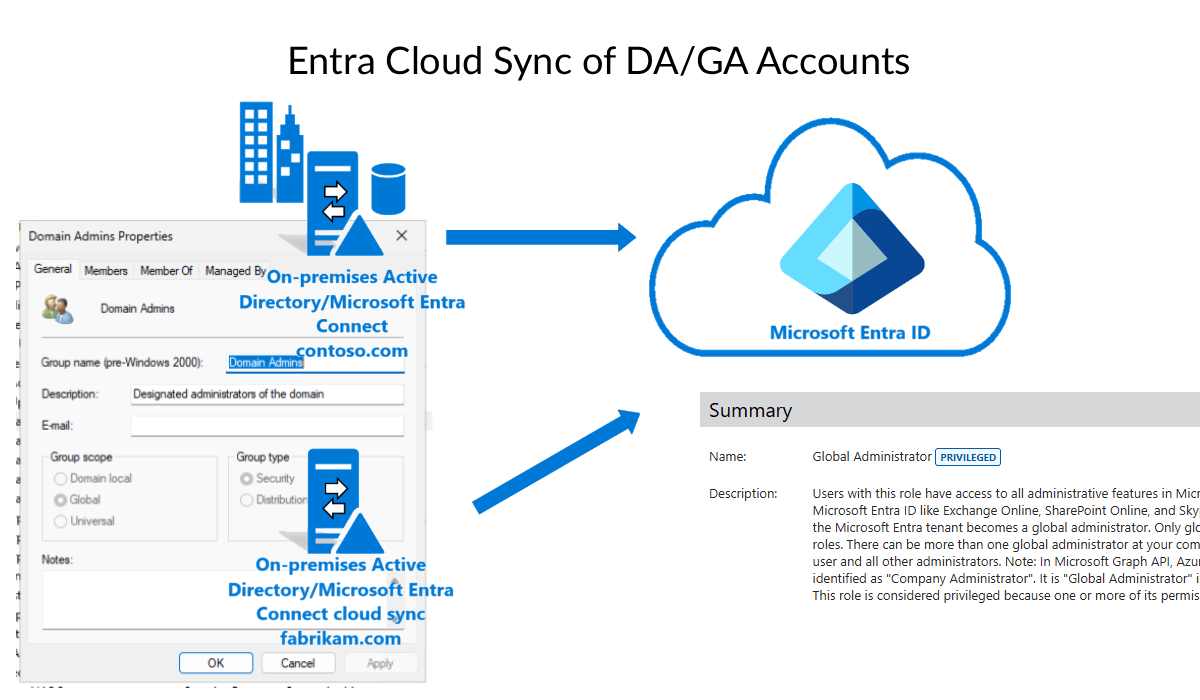
Short answer: no!
Many organisations are migrating away from self-hosted Active Directory toward cloud-native Microsoft Entra ID environments.
During this transition, administrators frequently set up their on-premises Domain Admin (DA) account as a Global Admin (GA) in Entra ID.
It feels like the right thing to do but here's why you should avoid this.
Bridging Security Boundaries: OnPrem -> Cloud Pivoting
The main reason is that if your on-premises Active Directory is breached, an attacker with Domain Admin access can now pivot to the cloud and takeover your Entra environment. When in scope we've been able to demonstrate this in internal network penetration tests after we've obtained Domain Admin.
Likewise, if an attacker compromises your cloud environment and obtains Global Administrator privileges (if you have password writeback enabled) this could also allow an attacker to compromise your Active Directory environment.
Third Party References
Don't just trust this blog though, here are some references from third parties about this topic.
The Center for Internet Security (CIS) publishes best practice controls and guidelines to protect against the most common cyber attacks. They also publish a Microsoft 365 control that specifically relates to this topic.
1.1.1 Ensure administrative accounts are not On-premises sync enabled/are cloud-only.
Remediation will require first identifying the privileged accounts that are synced from on-premises and then creating a new cloud-only account for that user. Once a replacement account is established, the hybrid account should have its role reduced to that of a non-privileged user or removed depending on the need.


Additionally, Microsoft themselves also publish similar guidance.
Best practice: Don’t synchronize accounts to Microsoft Entra ID that have high privileges in your existing Active Directory instance.
 msmbaldwin
Recommendations
- Sync only the end-user accounts that are required.
- Create cloud-only accounts for purposes of administration.
- Consider obtaining Entra ID P2 licensing to leverage Privileged Identity Management (PIM) features in Entra.